1.1
Transmission Rate - Bits/ second
The two types of packet switches today: - routers, and link-layer switches
- Each ISP, regardless of if it is lower-tier or upper-tier, is managed independently, runs the IP protocol, and follows rules for naming and address conventions
- The IETF creates internet standards, in documents called **requests for comments (RFC)
- Socket Interface are provided by end systems to provide and get information from the internet.
- Pretty much just rules that the sender must follow to get stuff sent out
1.2 The Network Edge
- Blades - Hosts in data centers inside boxes
- Two most seen types of broadband residential access are
- Digital subscriber line (DSL)
- Uses existing telephone line to exchange data with a digital subscriber line access multiplexer (DSLAM)
- Located in the telephone company's central office (CO)
- Translates the analog signal sent from the house back into digital format here

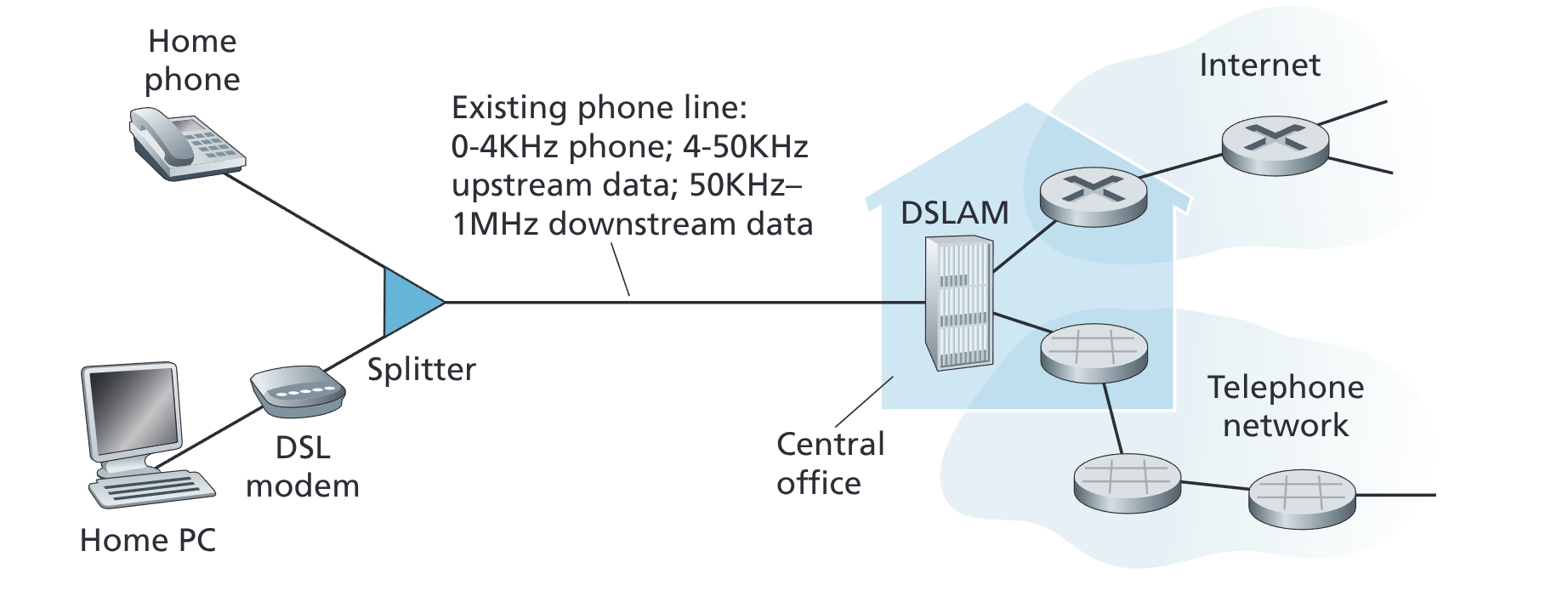
- The splitter separates the data and telephone signals
- Hundreds to thousands of households connect to a single DSLAM
- DSL standards set the speeds for downstream and upstream transmission
- Newer standard allows downstream rates of 1Gbps
- House must be within 5 to 10 miles of the central office
- Uses existing telephone line to exchange data with a digital subscriber line access multiplexer (DSLAM)
- Cable Internet Access - uses cable television infrastructure
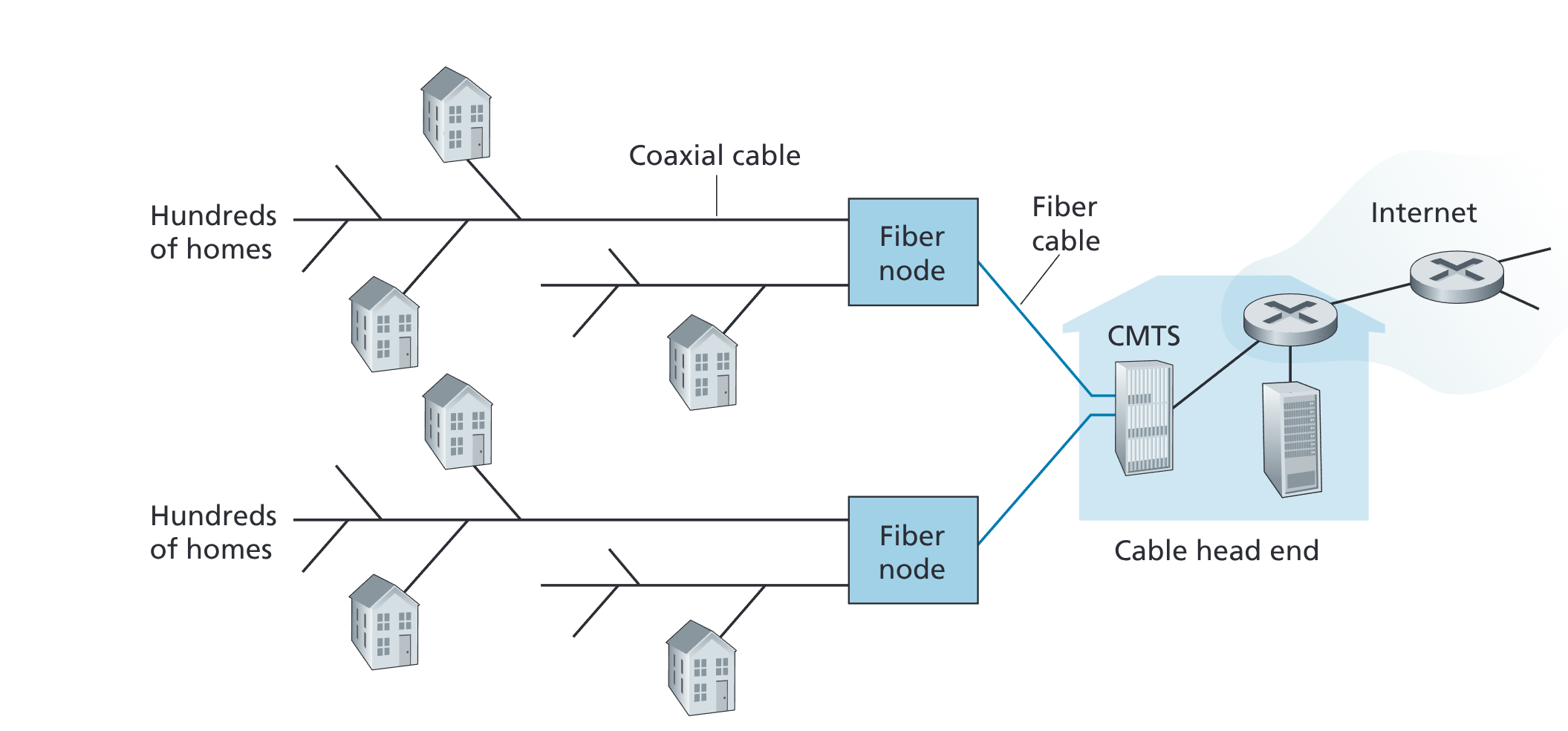
- Both fiber and coaxial cable are employed making us call it a hybrid fiber coax (HFC)
- Cable modems are used
- CMTS - Similar to DSL network's DSLAM - turns analog into digital format
- Similar to DSL, the downstream is typically faster than the upstream
- What makes it unique is that every packet sent from the head end is sent to every house
- Makes it slower if lots of people using a lot at the same time
- Fiber to the Home (FTTH) - Connects the house to the CO through fiber directly
- Most simple form is direct fiber (one fiber for each home from the CO)
- More common is one fiber shared by multiple homes
- AON - Active Optical Network
- Essentially switched ethernet
- PON - Passive Optical Network
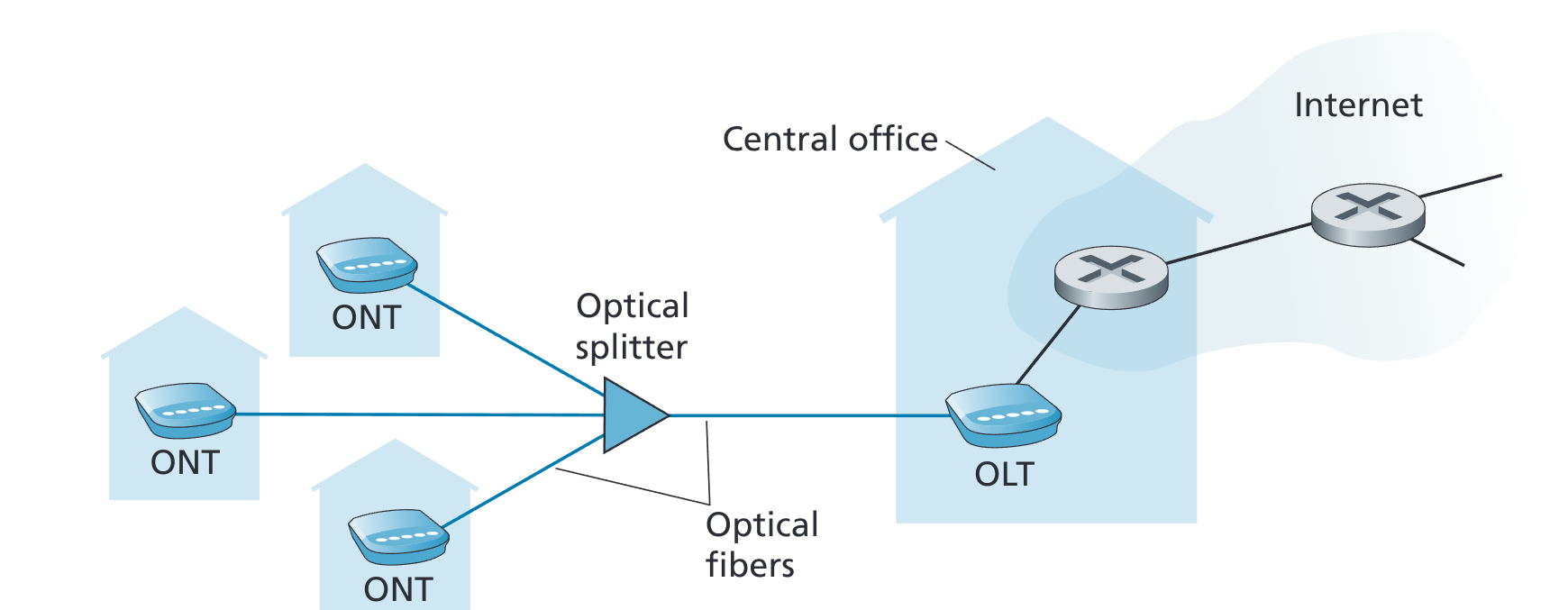
- ONT - Connects to the router to fiber
- Splitter - Splits the fiber route from the CO for the entire neighborhood
- OLT - Located at the CO to convert fiber to a telco router that goes to the internet
- AON - Active Optical Network
- 5G Fixed Wireless - No need to install costly cabling from CO to home
- Digital subscriber line (DSL)
-
1.2.2 Physical Media
- Guided Media - Solid medium that info is traveled on
- Unguided Media - Waves that propagate in the atmosphere
- Twisted Pair - Two insulated copper wires to prevent interference, also called UTP - unshielded twisted pair
- Used for LAN or other networks within a building
- Used alongside fiber optic for high speed LAN networking
- 6a cable can achieve speeds of up to 10Gbps
- Coaxial Cable - Can be used as a guided shared medium. Several end systems can be connected to the same cable
- Fiber Optics - Super fast and can avoid interference, though, transmitters, receivers and switchers for fiber optic are too expensive right now.
- Optical Carrier standard n * 51.8 Mbps.
- OC-N: OC-1, OC-3, OC-12, etc.
- Optical Carrier standard n * 51.8 Mbps.
- Terrestrial Radio Channels - No physical wires but susceptible to weather and environment changes
- Split into short distance (e.g., with one or two meters); (mice bluetooth)
- those that operate in local areas, typically spanning from ten to a few hundred meters; (wifi)
- and those that oper- ate in the wide area, spanning tens of kilometers. (data)
- Satellite Radio Channels - Receives transmissions on one frequency band and then regenerates the signal on another frequency to connect earth based transmitter and receivers.
- Geostationary Satellites - Remain in the same spot about earth. Slow at 280 millisecond propagation delay, but allow people without access to DSL or cable-based internet access.
- Low-Earth Orbiting Satellites (LEO) - Placed closer to earth and are always moving. Require a lot of them, but they communicate with each other.
1.3 The Network Core
-
1.3.1 Packet Switching
- Packets are transmitted over each communication link at a rate equal to the full transmission rate of the link
- If I'm sending a packet of L bits, on a link with a transmission rate R bits/sec. Then the time to transmit the packet is L/R seconds
- Store and Forward transmission means that the packet switch has to receive the entire packet before it can send the first bit of the packet to the outbound link.
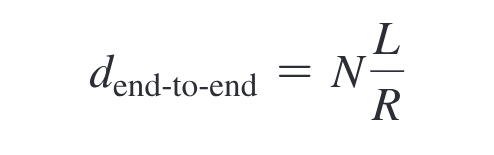
- Time it takes for a packet to travel from one end to another end with N links.
- In addition to store and forward delays, now we encounter queuing delays when multiple links are attached to the packet switch.
- Packet loss can occur if the queue is full
- Routing table analyzes the destination IP address, and then directs the packet to the next corresponding router.
- The routers follow routing protocols that are used to automatically set the forwarding tables
-
1.3.2 Circuit Switching
- Resources that are needed along the path between the end systems are reserved
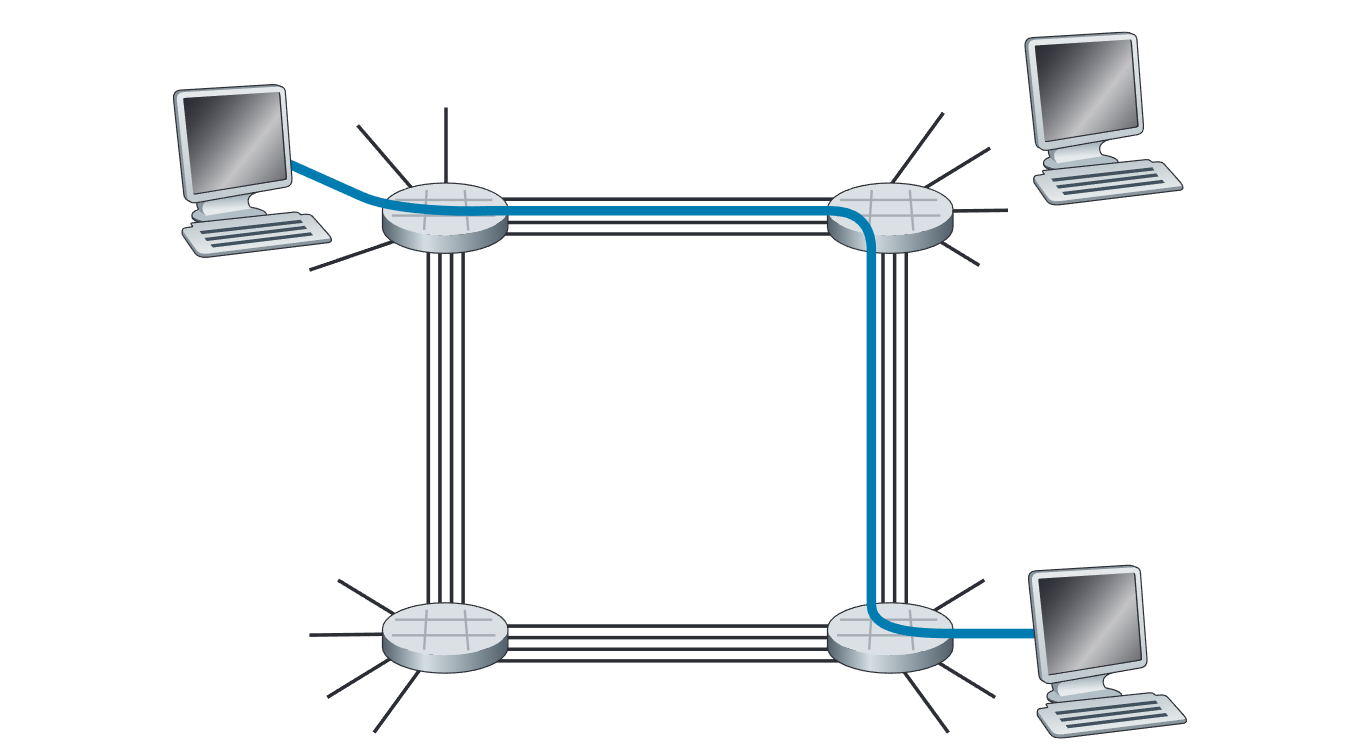
- If each link between the circuits its 1mbps, then it is split into four at 250 kbps
- The internet uses packet switching
- A circuit is implemented with either:
- Frequency-division Multiplexing (FDM) - Bandwidths are split up so that each connections can share and each gets its own frequency.
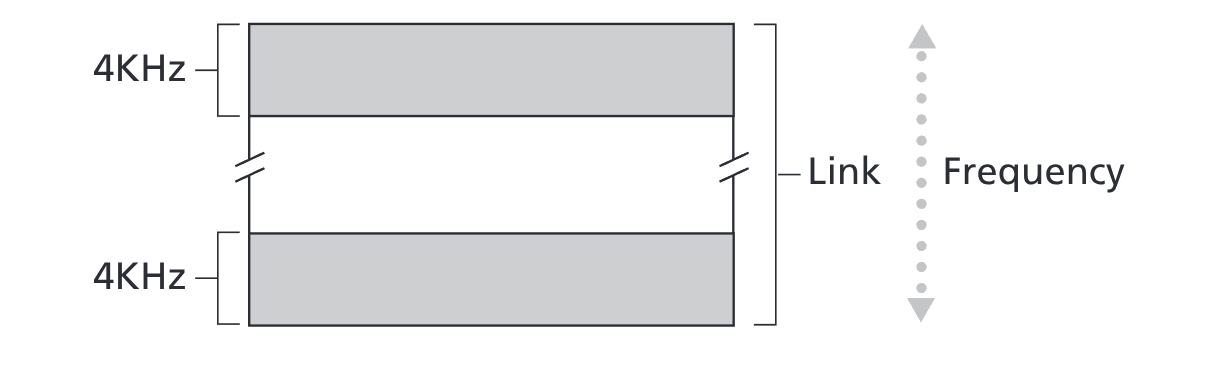
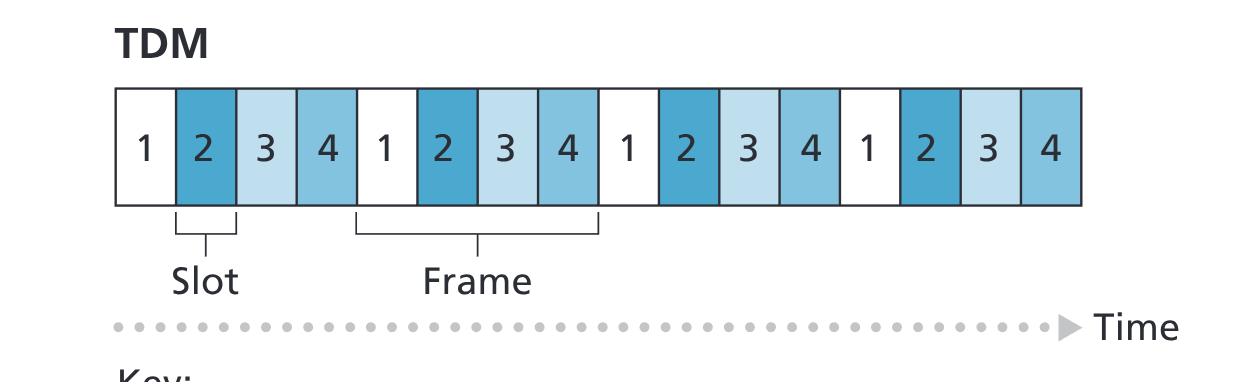
- Time-division Multiplexing (TDM) - time is divided into frames of fixed duration. When a new connection is made, the network dedicates one time slot in every frame to this connection.
- The transmission rate of a circuit is equal to the frame rate multiplied by the number of bits in a slot
-
1.3.3 A Network of Networks
- Network of networks essentially means just ISPs connecting to eachother
- Network Structure 1
- Interconnects all the ISPs with a single global ISP
- Network Structure 2
- Multiple of these global transit ISPs
- Network Structure 3
- Instead each region must have its own regional ISP that the access ISPs in the region connect to
- Each regional ISP now connects to a tier 1 ISP
- AT&T NTT Spring Level 3 Communications
- Each regional ISP now connects to a tier 1 ISP
- Instead each region must have its own regional ISP that the access ISPs in the region connect to
- *Network Structure 4
- Point of Presence (POP) - Exist at all levels except at the access ISP. Simply a group of routers at the provider ISP that customer ISP can connect to.
- Multi-Homing - When an customer ISP can subscribe to multiple ISPs. This allows for redundancy in case one goes down.
- Peering - Connection between customer ISP so that they can increase speed. Neither really pays the other.
- Internet Exchange Point (IXP) - Third party companies that create a meeting point where multiple ISPs can peer together.
- Network Structure 5 (Today's internet)
- Content-provider networks. Huge data centers located around the world and then interconnected to each other as well as with IXPs.
1.4 Delay, Loss, and Throughput in Packet-Switched Networks
Throughput - The amount of data per second that can be transferred
 - Types of delays:
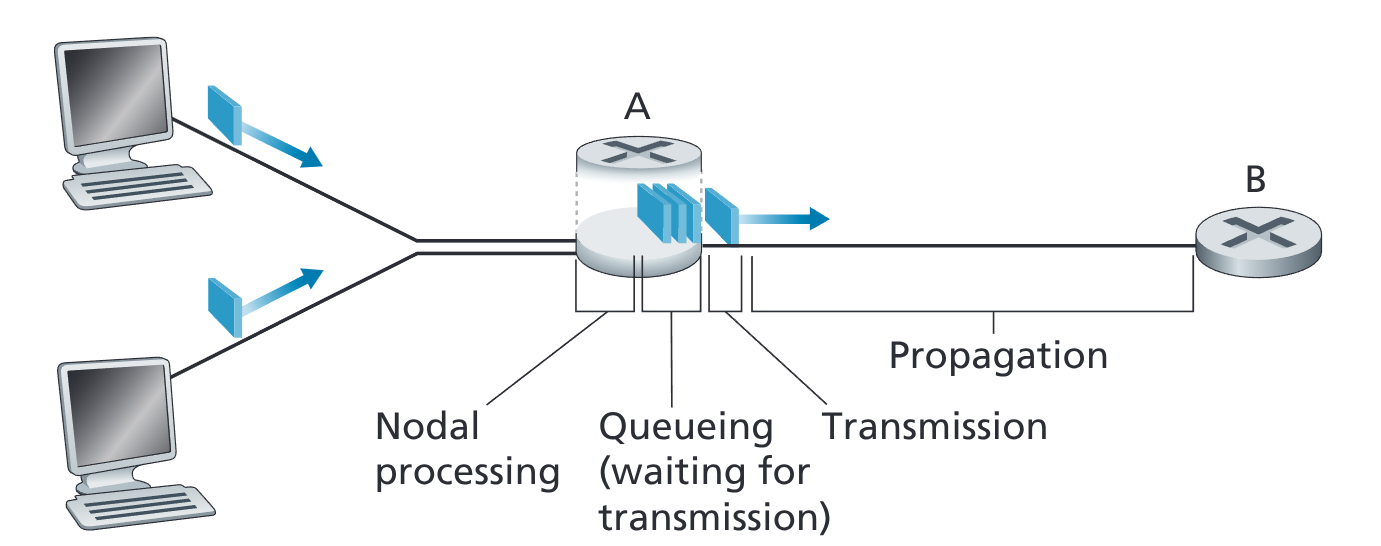
- Processing Delay - The time that it takes for the router A to analyze the header and check for any bit-level errors
- Microseconds or less
- Queuing Delay - Depends on how many other packets are currently in the queue to be sent out
- Microseconds to milliseconds
- Transmission Delay - L/R. L is the number of bits and R is the Mbps
- Microseconds to milliseconds
- Propagation Delay - Time it takes to travel the wire. Depends on the physical medium.
- Distance between two routers divided by the propagation speed.
- Difference between propagation delay and transmission delay:
- Transmission delay: time to push through the router
- Propagation delay: time to travel the wire
-
- Types of delays:
- Processing Delay - The time that it takes for the router A to analyze the header and check for any bit-level errors
- Microseconds or less
- Queuing Delay - Depends on how many other packets are currently in the queue to be sent out
- Microseconds to milliseconds
- Transmission Delay - L/R. L is the number of bits and R is the Mbps
- Microseconds to milliseconds
- Propagation Delay - Time it takes to travel the wire. Depends on the physical medium.
- Distance between two routers divided by the propagation speed.
- Difference between propagation delay and transmission delay:
- Transmission delay: time to push through the router
- Propagation delay: time to travel the wire
-  - ## 1.4.2 Queuing Delay and Packet Loss
- Traffic Intensity - La/R
- L - How many bits in a packet
- a - average number of packets arriving a second
- R - Transmission rate (how fast pushed through the router)
- If LA/R > 1, then the average rate at which bits arrive at the queue exceeds the rate that the packets can be transmitted from the queue.
- If this happens the queue increases without bound and queuing delay goes to infinity
- (n-1)L/R seconds for burst arriving packets.
-
- ## 1.4.2 Queuing Delay and Packet Loss
- Traffic Intensity - La/R
- L - How many bits in a packet
- a - average number of packets arriving a second
- R - Transmission rate (how fast pushed through the router)
- If LA/R > 1, then the average rate at which bits arrive at the queue exceeds the rate that the packets can be transmitted from the queue.
- If this happens the queue increases without bound and queuing delay goes to infinity
- (n-1)L/R seconds for burst arriving packets.
- 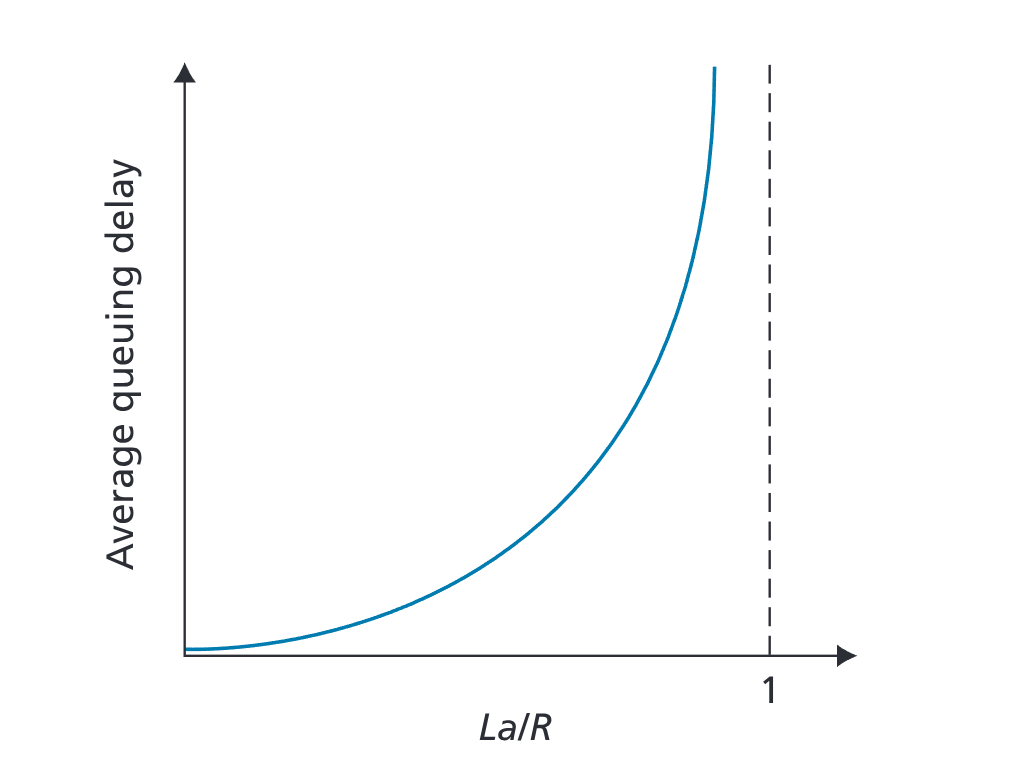 - Increases exponentially, as you have to wait longer and longer
- ##### Packet Loss
- Because the queue is finite, if we arrive at a full queue then we will lose some packets.
- This will be covered in later chapters but it gets made up so don't worry
- ## 1.4.3 End-to-End Delay
-
- Increases exponentially, as you have to wait longer and longer
- ##### Packet Loss
- Because the queue is finite, if we arrive at a full queue then we will lose some packets.
- This will be covered in later chapters but it gets made up so don't worry
- ## 1.4.3 End-to-End Delay
-  - Traceroute - command to show the times the hops between the routers etc.
- Packetization Delay - The time it takes to fill a packet before it is sent out from the user.
- ##### 1.4.4 Throughput in Computer Networks
- Instantaneous Throughput - at any instant of time rate that you are receiving something in (bits/second). As seen when downloading stuff etc.
-
- Traceroute - command to show the times the hops between the routers etc.
- Packetization Delay - The time it takes to fill a packet before it is sent out from the user.
- ##### 1.4.4 Throughput in Computer Networks
- Instantaneous Throughput - at any instant of time rate that you are receiving something in (bits/second). As seen when downloading stuff etc.
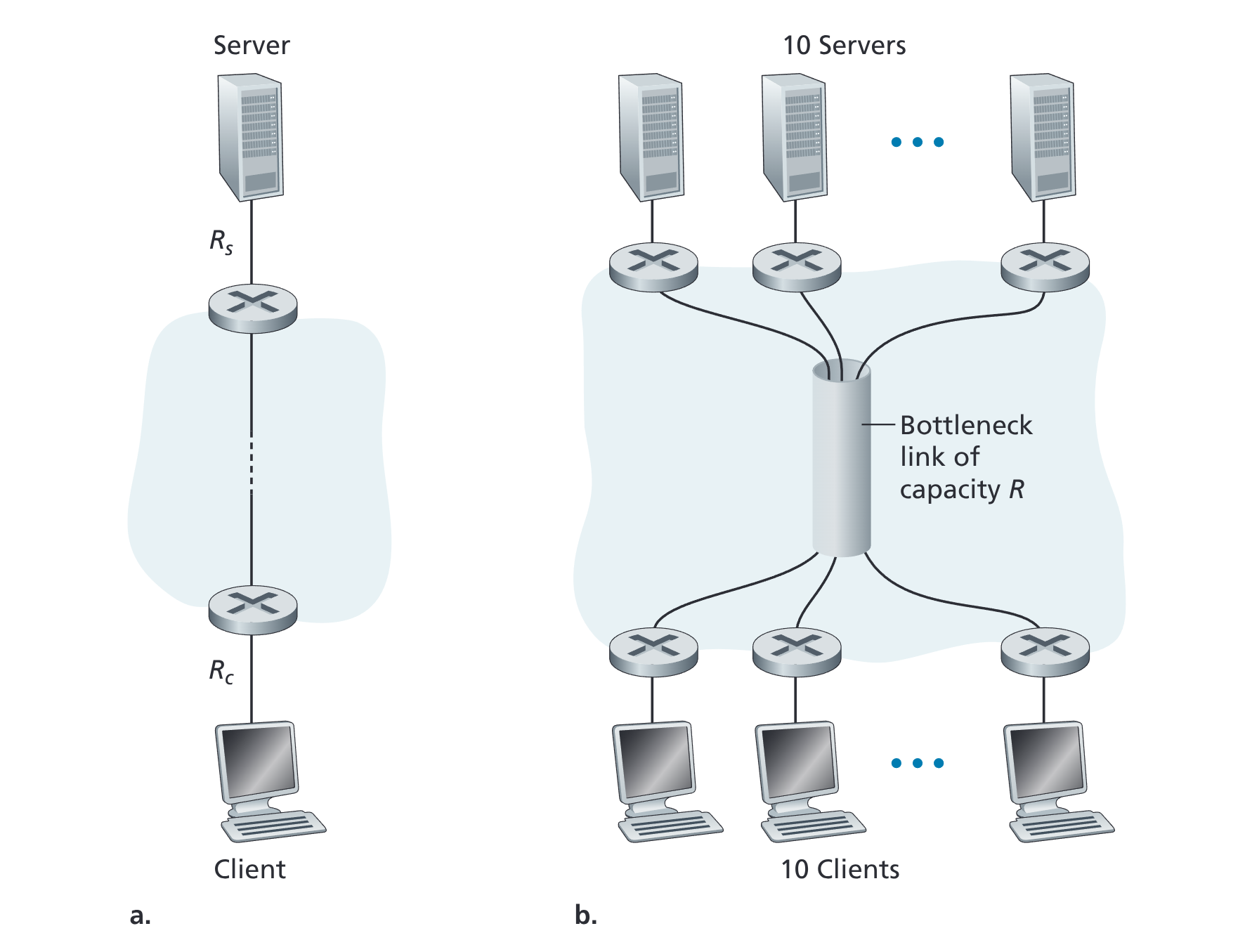
-  - Throughput between these two is min {Rc , RS}
- It is the transmission rate of the bottleneck link
-
- Throughput between these two is min {Rc , RS}
- It is the transmission rate of the bottleneck link
- 
1.5 Protocol Layers and Their Service Models
1.5.1 Layered Architecture
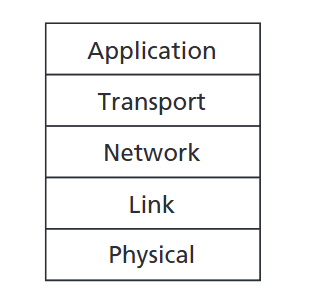
- Five layer internet protocol stack
- Application Layer
- Packet of information at this layer is called a message
- Transport Layer
- The transport-layer packet is a segment
- Network Layer
- The network-layer packet is known as datagram
- Routing protocols also exist here
- Also known the IP layer
- Delivers the segment from the transport layer to destination
- Link Layer
- Moves the datagram from routers to router
- Provides reliable delivery from one end system to another
- Ethernet, WiFi, etc.
- Known as Frames at this point
- May use different links along the route that is taken
- Physical Layer
- Move individual bits within the frame from one node to the next.
- Could be twisted-pair copper wire, fiber optic, etc.
1.5.2 Encapsulation
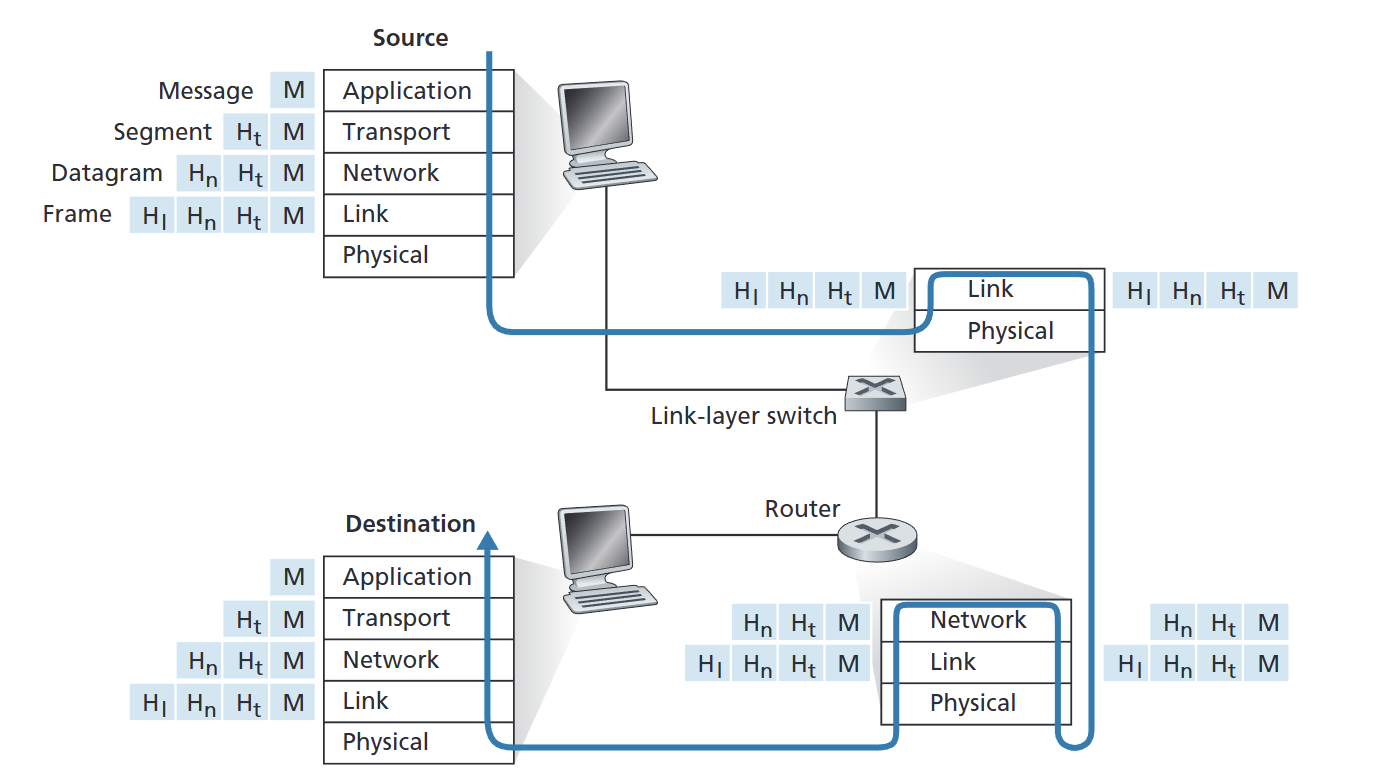
- The encapsulation could be more complex especially if a large message needs to be sent and the receiving end has to reconstruct it from its constituent datagrams.
2 Comments